01. Introduction
1.1 Purpose of Document
This is a Preliminary Requirements specification document for a new web-based information management system which was selected for the build out of [cp:scripting key='DataSource' dataId='05b1847c-56b8-4302-bb30-14a5d1c3cba2' /] as either the application to be used for the actual solution, or as the application to test as part of a pilot project to validate it's capabilities. If this is a pilot project, then all work is done with the understanding that it is not the finished solution, ready for full deployment, but rather the prototype to 'simulate' certain functions once implemented. Oxcyon understands that Client acceptance of the Pilot Project is required, before a decision may be made to select this application as the finished solution, or prior to award of any contract for the full, implemented licensed version.
Centralpoint is a Digital Experience Platfrom technology, which is authored by Oxcyon, Inc. which provides a suite of over 220 modules and tools. Oxcyon,is the author or manufacturer of software product and related modules known as Centralpoint. The project management and implementation will be led by Oxcyon's Production Management team. This team will consist of a Project Manager who will act as your primary, singular point of contact, and that project manager will be responsible for overseeing other internal resources at Oxcyon to implement the project. These resources consist of (but are not limited to), Designers, Analysts, Quality Assurance analysts, Data Scientist, and Developers. Within the development team, this breaks out to Network Administrators, Senior (Product) Architects, Database Engineers, and Integration developers. All issues managed for your project will be managed within the Oxcyon Issue Management System, and Oxcyon cannot accept issues (or translate via dictation) any issue from any phone or web conference call (discussion). All issues which cover specific requirements (beyond this Scope of Work, Project Requirements, and/or Use Cases), or that were not originally articulated by the Client prior to beginning work, must be submitted in writing, via the Online Issue Management system to request, or identify any new issue. These issues when submitted, must be tagged to your assigned Project Manager, in order for your issue to get the attention it deserves. Should you fail to tag it to your assigned production manager, we cannot be held responsible for receiving it, nor can we provide any guarantees that it will be responded to .
1.2 Project Summary
| Project Name: |
[cp:scripting key='DataSource' dataId='05b1847c-56b8-4302-bb30-14a5d1c3cba2' /] |
| Oxcyon Project Manager: |
Joseph Frey, jfrey@oxcyon.com, 440-243-1772 |
Oxcyon
Project Team: |
Joseph Frey, Project Manager
Bret Allison, Lead Analyst
Neil Jacobowski, Analyst
James Kekic, Sales Support Analyst |
| Responsible Users: |
Client POC Contacts (TBD) |
1.3 Background
Oxcyon sells technology which is designed to centralize, relate and streamline the search, access and workflow for your members (employees, customers, dealers or others) securely. Oxcyon customers include both businesses and government agencies interested in decreasing the time it traditionally takes clients to search, access, and take action (create documents, order projects, process some requests) incorporating Centralpoint as a technology to streamline and reduce this time. Oxcyon has identified two trends that they believe will cause explosive growth in the demand for their product. The first is the need to centrally manage or index information from disparate sources. The second is to index and classify this disparate information by virtue of the many Audiences, Roles, Tenants, and Classification (metadata, taxonomy) of your users, against this information. Oxcyon's technology Centralpoint leverages unique technology in order to 1.) Centralize (via scheduled routines against disparate data sources, 2.) Securely Authenticate all users (Global Login), 3.) Classify (to create, manage, and automate how your disparate information is classified (or tagged) in order to serve the appropriate audiences (users) who need access to it, and 4.) Capture the user activity around the access of that information, in which to study the usefulness, time savings, and to personalize what content they 'should' want upon revisit. Centralpoint, as a Digital Experience Platform, incorporates many different technology functions, working in unison. (Diagram below)

Figure 1. Digital Experience Roadmap (Illustrating the many relationships to centralize and harmonize information. (Gartner)
Because of the innovative and technical nature of Oxcyon's products, Oxcyon employs sales agents, and production management professionals who can guide customers through the process of choosing from Centralpoint's module gallery (of available functions) to properly forumulate the right solution for the client to apply this roadmap (where applicable) within the organizational structure of each client. This entails customizing Centralpiont around the Taxonomy (Metadata, Terms, Keywords, Codes, Audiences and (Security) Roles of the Client. r At Oxcyon, your Production Manager are identified as a product "owners". The product owner is the expert on translating and implementing these unique features of your organization around this installed version of Centralpoint. .
Currently the client seeks to centralize disparate data sources (Structured data (SQL, Oracle, CSV, Json, XML, Excel) and/or Unstructured data (Word, PDF, Excel, Images, Videos) in order to streamline the day to day operations of their employees (or staff). The client seeks to do this considerate of their network security, meaning that this project will require integration with the current ID Management systems of Client (AD (Active Directory), SAML, oAuth, OpenID, or custom authentication). This is to demonstrate or to implement unique access for each worker, which will summon, filter, and provide access to only the data types (structured or unstructured) that each may have access to.
The Client further seeks to make such centralized disparate data sources available, in order to create and render new collections. In this model, these many data sources will be used to quickly and easily assemble needed information collections, which would empower the Client with rapid response (to assemble) accurate (fresh) information, each time. The output of these new records created could be in a variety of formats (PDF, Word, Json, XML, PPT), and each function to create new assets would be subject to either a simulated (in the case of a Pilot Project) or actual workflow scenarios. In other words, Oxcyon will be expected to show the rapid assembly of these files, in a variety of output types, and also show the workflow, or capabitliy to support workflow regarind the editing, approval, or denial of any new asset (or collection) within the enviornment.
Problems with the current Client system or process include:
- the information available is too limited and the user cannot immediately place an order or take action easily
- the existence of two or more databases or data sources means information is often inconsistent or incorrect
- users who need more technical information have difficulty accessing the relevant data collections, and it often requires reformatting
- time is often not available for the proper assembly of these new assets (documents, booklets, collections) as the Client faces mission critical (time sensitve) demands.
1.4 Project Scope
The scope of this project is to develop (a Pilot) of a web-based Knowledge Management Platform, that supports secure, rapid assembly of need information collections (documents, booklets, file folders) pulling from disparate data sets and/or collections of assets. Oxcyon will deploy both a development portal (local on Oxcyon's environment) and provide an on premise installation of Centralpoint (at Client), in order to set up and prove these claims. All demonstrations will be conducted via web conference, using Oxcyon's local development site, however, the Client will have 'mirror image access' of exactly what was set up (at Oxcyon internally), On Premise, at the client's facility. This is because Oxcyon does not possess the security access or does it have the security clearance to work with live, actual data sets of client. Oxcyon will be demonstrating simulations (with example content), whereas the client will be free to demonstrate (local to their team) actual content or data. This is to prove Oxcyon's claim that this enviornent may run on premise, and connect directly to the (secure) sysems which Client posses.
1.5 System Purpose
The purpose of the system will be to create a 'hub' of data sources (connections to disparate data sources) in which to drag, drop, and assemble new collections of information (documents, booklets, file foldes, collections), needed by various departments and roles of individuals. The Pilot Project iwill be to demonstrate and prove this high level capabilites, but not be expected to generate 'any' new assets which Client may wish to. For the purpose of the Pilot, certain examples will be used (Document Types). These document types, which are frequently used by Client, will be the model, for Oxcyon to set up, develop and train Client, on the usage. For this Pilot Project,
Oxcyon will develop up to 5 frequently used forms by Client as the model. The client may select which 5 forms or collections they would like to see, and would be an expected output format type of MS/Word, and/or Adobe PDF. The Client will also provide a basic (not to exceed two step) workflow, so that as these forms are demonstrated, the workflow, and editing process can be demonstrated. This demonstration will show the scheduled 'ingestion' or live data access to remote data sources, in order to generate dynamically these five output documents. This example will show the user (log in ID), and use such ID to automaticaly filter the available menu by (security) role, allowing different users within Client, to author 'from' different data sources, as their roles may allow. Oxcyon will also show (as one of these 5 frequently used form examples) an example of a 'Dynamic Form to Document' process. This will allow the user to answer a series of (not more than 3 successive) questions, which will then present a refined list of questions (from the previous question), in order to successfully prove the ability to dynamically assemble reports (summoning data from disparate sources) as a result of the answers to questions provided.
Beyond the initial purpose to prove dynamic assembly of asset collections (documents, files). Oxcyon will 'go beyond' the scope to show other departments the high level possiblities of how the centralization and aggegation of data and content can do for them. This may include departments like HR, Travel, Security, etc., to prove the long range capabilities of Centralpoint as an over arching 'Knowledge Management Platform', and will be eager to do so. Oxcyon is NOT required to build out any of these departmental suite of solutions beyond the dynamic document assembly, but will do what it can, with minimal effort (not to distract from the primary system purpose). These efforts may include, setting up learning management, importing in Directory lists (Hotel directories, supplier directories, etc.), in order to demonstrate the self service aspects of having information centralized (ordering, taking action, comparing, rating, reviewing, sorting, etc.). These efforts are volunatiry and in good faith by Oxcyon, to prove the 'reusability' of this pilot for many departments within the Client organization.
1.5.1 Users
Those who will primarily benefit from the new system and those who will be affected by the new system include
- Knowledge Authors:
- Upon implementation of the system, Knowledge authors will find web based dashboards which will allow them to create, edit, delete or revise new asset collections based on their:
a.) Selection of those disparate content types (by check box)
b.) By answers certain questions, wherein the answers guide them to a dynamically populated asset collection
c.) By draggin and dropping dynamic content references into their form to render their new asset or collection.
d.) The system will demonstrate how it can record and report on the activity of all users who accessed each record, and when.
e.) The system will demonstrate how these new assets may inherit taxonomy (metadata) via automated means, based upon the content pulled into the document
- Read Only Viewers:
- a.)The system will demonstrate how some users may only be allowed to read, and download these newly created assets (without editing)
b.)The system will demonstrate how it can record and report on the activity of all users who accessed each record, and when.
c.) The system will demonstrate how two different users (by virtue of their differing roles) can access the same (singular) document, and each see different information (within the singular document) being role filtered
- Project Owners:
- a.) Project Owners will be allowed to create new rules (taxonomy, templates, forms, reports) to demonstrate the flexibility of the system, as well as their ability to maintain the system within the Client environment.
b.) Project Owners will be allowed to execute Data Transfer utilities to aggregate data from both structured and unstructured sources
c.) Project Owners will be allowed to install and set up Server and Database installation of System, to prove the systems performance within the Client Environment
d.) Project Owners will be alllowed to (and will have to) set up system to handshake with their internal security (authentication sources), under the direction of Oxcyon
e.) Project Owners will be allowed to generate reporting against any asset activity or user(s) activity around those newly created assets
f.) Project Owners will be allowed to generate new taxonomy types, including set up automated metadata rules against incoming data (ingested via Data Transfer tools)
Executive Support Department
a.) Executive Support Personnel will be able to compare the time invested in dynamically generated these asset collections vs. the traditional model to pull together needed information.
- Information Technology Department:
- This department will be allowed to investigate Centralpoint code (post installation), On Premise to meet their needed internal security requirements, and test authentication methods of users who log in
This department will be allowed to access Global Login (Authentication sources), Data Transformation tools, Root Directory (code of Centralpoint), Database Diagrams, and have full access to database (and source code, if needed), in which to perform any and all testing it needs to deem that system can be fully adopted by Client, in a full scale implementation, post pilot.
1.5.2 Location
The system will be available via download to be installed at Client's server facility of choice.
Oxcyon personnel will be working on the project remotely (form it's offices in Cleveland, Ohio, Akron, Ohio, Chicago, Illinois, and Los Angeles, California) and attending meetings with Client via web conference only.
Oxcyon intends to meet with Client, On Premise at Client facility post evaluation of the pilot to discuss Client findings, and discuss potential implementation (post pilot).
1.5.3 Responsibilities
The primary responsibilities of the new system:
- provide client staff direct access to up-to-date, accurate information on which they can utlize to assemble new asset colletions quickly.
- support customization to support the specific needs of the client.
- allow differential access to web pages and information based on type of user (role)
- allow client users to process a request, (new document creation, or hotel booking) through a web interface, triggering workflow and dynamically creating the desired output
- allow client to request access to disparate information needed from a AI Assitant (button) from current client web applications (in which the AI Assistance has been placed and allowed to operate)
- provide staff improved access to information which is current and live at all times.
- allow product owners to maintain information about their information and it's workflow
- allow access to version history and user access reporting on demand
- send new requests through workflow to the appropriate reviewer
Other 'desired' features of the new system:
- a consistent "look and feel" throughout the website, by department or role
- full-text searches of the information a user has permission to access
- on-line help in website navigation
- password protection and roles based access scheme for every view
- translation of a web page to another language (using Google API)
- Mobile Responsive (mobile friendly) view of each desktop view (including forms, and new dynamic assets created)
- Live Documents (which can automatically be updated, each time they are opened)
- How disparate data sources (or ingested) content can be made portable (via an AI assistant, whilst on other (client) web based applications
- Online Learning Management (based upon questions answered in line with any asset)
- EDI/Online Ordering (how forms submitted could trigger 'multiple resources' from a central point (booking trips, or multi step functions centralized)
- Natual Language Search (how words not found in documents could trigger those documents as a potential match)
- Reverse Hyperlinks (how any word, term, acronym could be dynamically referenced from all documents (from one record or one definition)
- Targeted 'Ads', (how one search or one action taken may remind (through advertisement and link) other important items (which typically preced the last action)
- Parametic (Tiered) searches, wherein the selection of one menu (for Contintents like Asia) prompts the corresponding sub menu (like Japan or China),
1.5.4 Need
This system is needed in order to service the expected increase in disparate data, and the corresponding demand for assets (documents, information, collections) to be rendered from them. The time sensitive, mission critical nature of any scenario within Client, suggests that such a system would be able to provide information which is of higher relevance, more accurate output, and an ability to render complex collections of information quickly. The new system will allow Client to rapidly respond to needed information, and reduce costs based upon resources and time required today to render these collections in the traditional manner.
1.6 Overview of Document
The rest of this document gives the detailed specifications for the new system. It is organized as follows:
- Section 2: Functional Objectives
Each objective gives a desired behavior for the system, a business justification, and a measure to determine if the final system has successfully met the objective. These objectives are organized by priority. In order for the new system to be considered successful, all high priority objectives must be met.
- Section 3: Non-Functional Objectives
This section is organized by category. Each objective specifies a technical requirement or constraint on the overall characteristics of the system. Each objective is measurable.
- Section 4: Context Model
This section gives a text description of the goal of the system, and a pictorial description of the scope of the system in a context diagram. Those entities outside the system that interact with the system are described.
- Section 5: Use Case Model
The specific behavioral requirements of the system are detailed in a series of use cases. Each use case accomplishes a business task and shows the interaction between the system and some outside actor. Each use case is described with both text and an interaction diagram. An interface prototype is also shown. The system use case diagram depicts the interactions between all use cases and system actors.
- Section 6: An appendix containing a glossary that
defines terms specific to this project
1.7 Deliverables of [cp:scripting key='DataSource' dataId='05b1847c-56b8-4302-bb30-14a5d1c3cba2' /]
Oxcyon shall deliver to Client the following items, considered the Deliverables
a.) Oxcyon will provide a Centralpoint Master Server for download and installation with Client Enviornment
i.) Including automated back up tools
b.) Oxcyon will provide a Centralpoint Development & QC (Staging) & Centralpoint Portal Environment within Client Environment
i.) Each with their own (Client provided IP Address) to demonstrate the abiltity to synchronize code and content between them (Dev->Staging->Production
c.) Oxcyon will provide a Centralpoint Portal (within Oxcyon's enviornment) for training, testing, and demonstrations
i.) Centralpoint Portal will offer out of the box integration tools to connect to SAML/AD/Other
d.) Oxcyon Centralpoint portal will have all modules 'active' in order to demonstrate over arching Knowledge Management (outside of the forms examples)
e.) Oxcyon will produce up to 5 live online forms (based upon actual real life scenarios at Client) to simulate rapid asset creation (leveraging disaparate data sources). These forms will be presented as a 'Template Gallery'
f.) Oxcyon will create simluated roles (within Oxcyon's enviornment) and instructions on how to set up real roles within the secure (On Premise environment)
g.) Oxcyon will set up and execute (not to exceed 10 data connections) wherein data is either being pulled in live, or via ingestion to demonstrate our ability to ingest and leverage both structured and unstructured data sources (SQL, XLS, JSON, XML, PDF, Word, Images)
h.) Oxcyon will set up 'scheduled' data ingestions to demonstrate the ability to pull from the 'most recent data sets'.
i.) Oxcyon will set up and provide a portal design which is mobile, responsive, including all pages (forms, reports, content dashboards)
j.) Oxcyon will provide training on all of the items mentioned above
k.) Oxcyon will provide online questionairres to assist the Client to gather needed information from any department curious about knowledge management (to process their requests)
l.) Oxyon will set up email alerts, which will be triggered periodically (daily, weekly, monthly) to sample users, to demostate our ability to notify users of 'new disparate data' which may have arrived
m.) Oxcyon will set up and provide training for it's Data Cleaning (Automated Metadata rules) to show how disparate data picked up, ingested or fed through centralpoint can inherit Client metadata (taxonomy) to build crosswalks (related data)
n.) Oxcyon will provide 'flipbook' viewing capability of any PDF output, and will provide MS/Word plug in (for any editing needed from Word).
o.) Oxcyon will provide a sample of NLS (Natural Language Search) libraries to use as an example to crosswalk terms
p.) Oxcyon will provide customization and modiciation to its forms, to allow for question/answer based guidance, to dynamically render output content (documents, collections)
q.) Oxcyon will provide visual search options of forms available (including dynamic forms created for this project) by users (scrolling pictures of forms, which users can select (role based)
r.) Oxcyon will provide both asset level and user level reporting, to include EXT grid view reports, and/or graphical charts showing the usage, topics, taxonomies being managed and thier trend
s.) Oxcyon will execute data imports to demonstrate our ability to transform information (including converting street addresses to maps) including proximity searhes
t.) Oxcyon will set up Audience (microsites) for Client to include Geograhpic Regions, and/or Departments, to show the subset of any of these items above, filtered by these audiences
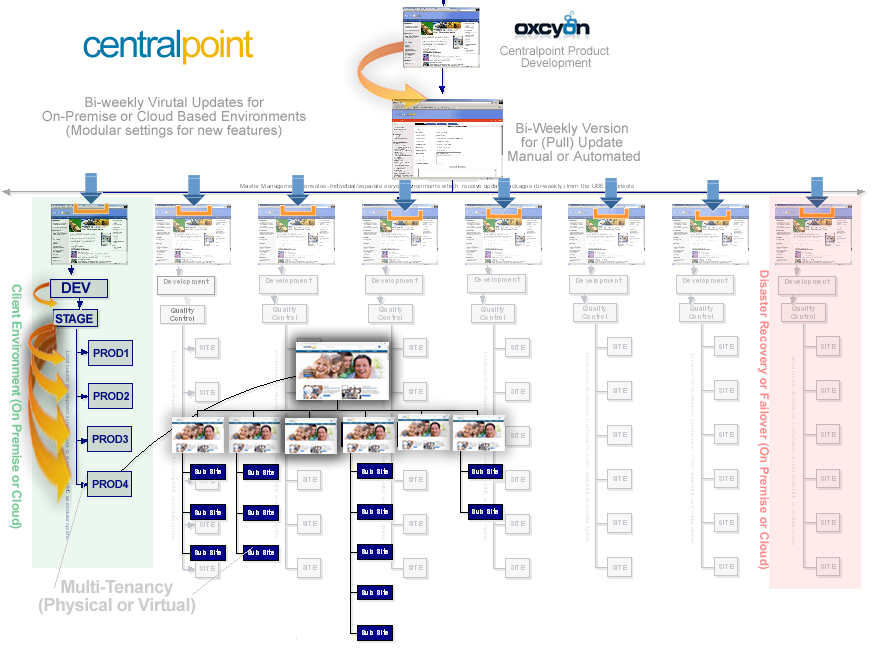
Figure 2. Centralpoint Archtecture, showing (in light green) the Centralpoint Master Server (On Premise) and tiered Dev/QC, Live Production portals living under.

FIgure 3. Enterprise View of Client Portal, including Family Tree of Audiences (Microsites for Deparments or Geographic Regions)
2aa4db54-93a0-4cfa-a2ac-f7226171c622